website redesign

Website Redesign vs Starting Fresh: What Is Better for Your Business?

Website redesign, revamp or refresh? Learn what to protect, improve or rebuild, how to preserve SEO and how to choose the right scope for your business.

Website redesign, revamp and refresh planning for a business website
Article section image

WEBSITE

Choose the smallest redesign scope that solves the actual business problem.

01

A website redesign can look like a design decision from the outside: new colours, cleaner typography, better images and a more modern homepage. For a real business, the decision is bigger.

You may already have pages ranking in Google, backlinks pointing to old URLs, customers who know where to find information, staff who depend on the current CMS, analytics history, forms, integrations and content that took years to build.

So before you redesign, revamp, refresh or rebuild your website, ask a more useful question:

What is worth protecting, what needs improving, and what is actually holding the business back?

This guide explains the difference between a website refresh, website revamp, full website redesign and rebuild from scratch. It also shows how to protect SEO, reduce migration risk and decide how far your business really needs to go.

If you are already evaluating professional help, see Trophy Developers' website redesign services in Uganda. The rest of this guide will help you decide what scope you actually need before requesting a proposal.

At a glance

  • A website redesign can look like a design decision from the outside: new colours, cleaner typography, better images and a more modern homepage.

The Short Answer: Refresh, Revamp, Redesign or Rebuild?

02

These terms are often used differently by agencies, so do not choose a project based on the label alone. Choose it based on the depth of change.

  • Website refresh: improves the visual layer, content and selected usability issues while keeping most of the existing structure and technology.

  • Website revamp: makes broader improvements to design, messaging, user journeys, page templates and functionality while preserving useful parts of the existing website.

  • Website redesign: rethinks how the website communicates, looks and works. It may include new information architecture, navigation, templates, content strategy, performance work and technical changes.

  • Website rebuild: replaces the underlying technical foundation, CMS, codebase or architecture. A rebuild often accompanies a redesign, but the two are not automatically the same thing.

The right option is the smallest scope that solves the real business problem without preserving limitations that should have been removed.

A Website Redesign Story That Changed How We Approach the Work

03

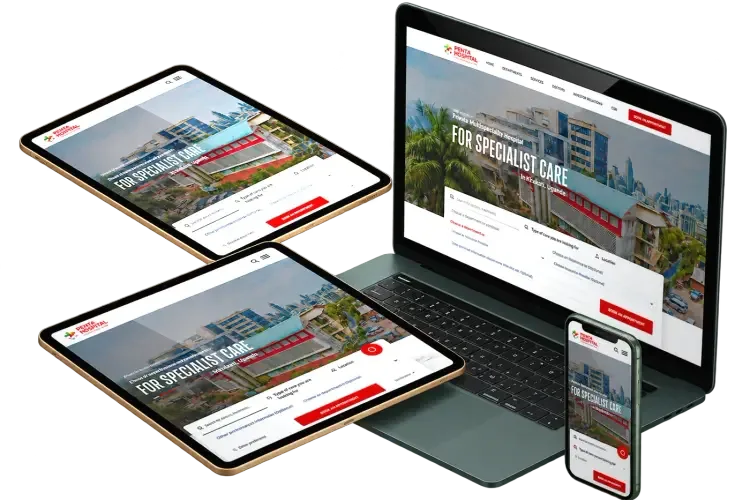
The Ruby Hospital Kampala project became one of our clearest lessons in website redesign.

The first direction looked straightforward: improve the existing WordPress website, refresh the design and strengthen the hospital's online presence. But as the project developed, the requirements became more serious. The hospital needed better appointment handling, stronger content control, improved performance, clearer user journeys and a foundation that could support future growth.

At that point, the problem was no longer simply, “How do we make this website look better?”

It had become, “What kind of digital system does this organisation actually need?”

The first redesign direction was not approved. Another provider later explored a different technology direction, but changing the platform alone did not solve the underlying requirements either.

When the project returned to Trophy Developers, we approached it differently. Instead of beginning with visual design, we reviewed user experience, SEO, content structure, appointment flow, technology limitations, branding, administration and scalability.

Ruby Hospital has since been relaunched on the new foundation. The website is now receiving high traffic, uses full server-side rendering (SSR), and was built with both SEO and Generative Engine Optimization (GEO) in mind. We also structured deployment and service updates so the public website can remain available while services are updated, avoiding unnecessary downtime for patients and visitors.

The lesson was not that one platform was good and another was bad. The lesson was that technology cannot rescue an unclear redesign brief—but the right architecture can support growth once the real requirements are understood.

The Real Problem Was Bigger Than the Technology Stack

04

It is easy to turn a website redesign discussion into a technology debate: WordPress or Webflow, traditional CMS or headless CMS, template or custom development, monolith or modern application stack.

Those choices matter, but they should come after the business requirements are understood.

For Ruby Hospital, the later direction used a more customised architecture because the project had expanded beyond a visual refresh. The website needed to support structured services, departments, doctors, publishing, appointments, SEO, GEO and future operational growth.

Full server-side rendering (SSR) was part of that foundation so important public content could be delivered as complete HTML from the server. The production approach also allowed service updates without taking the public website offline.

The result is not simply a newer-looking hospital website. It is a platform that can handle higher traffic, support search and AI discovery, and evolve without every service update becoming a public outage.

A smaller business with ten service pages and a reliable WordPress website may not need that level of rebuild at all.

This is why a responsible website redesign starts with diagnosis, not with a favourite platform.

What Is a Website Refresh?

05

A website refresh is the lightest level of change.

It is appropriate when the website's underlying structure still works, the CMS is usable, the key pages make sense and the main problem is that the presentation has become dated or inconsistent.

A website refresh may include:

  • Updated colours, typography and spacing

  • New photography, illustrations or icons

  • Improved homepage messaging

  • Cleaner calls to action

  • Mobile layout corrections

  • Image and performance optimisation

  • On-page SEO cleanup

  • Small accessibility improvements

A refresh should not be sold as the answer to broken navigation, an unsuitable CMS, poor information architecture or a website that cannot support the business model.

What Is a Website Revamp?

06

A website revamp sits between a cosmetic refresh and a ground-up rebuild.

The useful parts of the existing website remain, but significant customer-facing areas are improved. The goal is not simply to make the site look newer. It is to make it clearer, easier to use and better aligned with how the business now sells, communicates and serves customers.

A website revamp may include:

  • New page layouts and reusable design components

  • Stronger service and product messaging

  • Improved navigation and content hierarchy

  • Conversion-focused calls to action

  • Better forms and enquiry flows

  • SEO and internal-link improvements

  • Performance and Core Web Vitals work

  • Selected integrations or CMS improvements

A revamp is often appropriate when the website still has good bones but no longer represents the standard, positioning or customer experience of the business.

What Is a Website Redesign?

07

A website redesign is a broader rethink of the website experience.

It may change the visual system, page hierarchy, navigation, information architecture, content, user journeys, templates, functionality and technical implementation.

A redesign is appropriate when the existing website still contains value worth protecting, but too many important parts need coordinated improvement for a simple refresh to be enough.

Website redesign should answer questions such as:

  • Can visitors quickly understand what the business offers?

  • Are the most important customer journeys obvious?

  • Does the website reflect the current brand and positioning?

  • Are high-value pages easy to find from navigation and internal links?

  • Does the site work well on mobile devices?

  • Can the team update content without unnecessary developer dependence?

  • Can the current platform support the next stage of the business?

The design layer matters, but it is only one part of the redesign.

What Does Starting Fresh Actually Mean?

08

Starting fresh means rebuilding the website on a new technical or structural foundation rather than continuing to modify the existing one.

This can involve a new CMS, new codebase, new database structure, new design system, new navigation, new templates and a formal content migration.

Starting fresh does not mean throwing away everything the old website earned.

Good content, useful URLs, backlinks, media assets, analytics learnings, conversion data, customer language and search visibility may still be worth carrying forward.

A rebuild should replace the weak foundation while preserving the assets that still create business value.

Website Refresh vs Revamp vs Redesign vs Rebuild

09
OptionMain purposeWhat usually staysBest when
Website refreshModernise the presentationPlatform, structure and most page layoutsThe site works but looks or feels dated
Website revampImprove design, messaging and customer journeysUseful architecture, content and core platformThe foundation is sound but the experience is underperforming
Website redesignRethink the complete website experienceAnything proven to have valueUX, content, structure and conversion need coordinated change
Website rebuildReplace the technical foundationValuable content, URLs, data and brand assets where appropriateThe platform, architecture or codebase is limiting the business

The labels are less important than the scope. Ask the provider to explain exactly what will remain, what will change and why.

Start With a Website Audit, Not a New Homepage

10

A redesign decision should begin with evidence.

Before replacing the homepage or choosing a new visual direction, audit the current website. The goal is to separate assets from liabilities.

Review:

  • Organic traffic and important search queries

  • Pages that already rank

  • Backlinks and frequently linked URLs

  • High-converting pages and forms

  • Navigation and user journeys

  • Mobile usability

  • Page speed and Core Web Vitals

  • Broken links and crawl errors

  • Content quality and duplication

  • CMS limitations

  • Security and maintenance problems

  • Analytics and conversion tracking

  • Integrations the business relies on

This gives the redesign team a factual answer to three questions: keep, improve or replace?

When a Website Refresh Is Enough

11

Choose a website refresh when the underlying website is already doing most of its job.

A refresh may be enough when:

  • The website structure still makes sense

  • Important pages already rank and attract relevant traffic

  • The CMS is secure and manageable

  • Visitors can still find what they need

  • The business model has not changed significantly

  • The main weakness is visual age, inconsistent branding or dated content

In this situation, rebuilding everything can introduce cost and migration risk without solving a meaningful additional problem.

When a Website Revamp Is the Better Choice

12

A website revamp becomes more useful when surface changes are not enough, but the entire foundation does not need replacement.

Consider a revamp when:

  • The brand has evolved but the current website no longer communicates it clearly

  • Service pages exist but their messaging and conversion paths are weak

  • Navigation needs improvement without a total architectural reset

  • The site needs new components, landing pages or forms

  • The current CMS can still support the required improvements

  • SEO value should be preserved while customer experience is upgraded

A well-scoped revamp can produce a major improvement without paying to rebuild parts of the website that already work.

When a Full Website Redesign Is Better

13

A full website redesign is justified when several layers need to change together.

Examples include:

  • The website no longer reflects the current business strategy

  • Visitors struggle to understand services or find important information

  • The navigation has grown without a clear information architecture

  • Mobile UX is poor across many templates

  • Conversion paths are inconsistent or difficult to measure

  • Content has accumulated without clear hierarchy

  • The design system is inconsistent across the site

  • Performance and accessibility problems affect many pages

A redesign should improve the relationship between content, design, UX, SEO and business goals—not just replace the visual style.

When Starting Fresh Is the Better Business Decision

14

Starting fresh is usually the stronger option when the foundation itself is blocking progress.

A rebuild may be justified when:

  • The CMS or framework is unsupported, insecure or difficult to maintain

  • The website cannot support important integrations

  • The existing architecture makes new features unusually expensive

  • The business needs structured workflows, dashboards, accounts or application-like functionality

  • Content management has become slow or error-prone

  • The codebase contains years of conflicting patches

  • The organisation has fundamentally changed its services, audiences or operating model

The Ruby Hospital project moved in this direction because the requirements had grown beyond a simple visual website update. The new foundation needed to support a broader digital operation.

Website Redesign and SEO: Protect What Already Works

15

A redesign can improve SEO, but careless migration can also damage search visibility.

The risk increases when URLs change, content is removed, internal links are rewritten, page titles disappear or old pages are simply deleted.

Before launch, create an inventory of important URLs and decide what happens to each one.

  • Keep valuable URLs unchanged where practical

  • Map changed URLs to their closest relevant replacement

  • Use permanent server-side redirects for genuinely moved pages

  • Update internal links so they point directly to the new destinations

  • Check canonical URLs

  • Update XML sitemaps

  • Preserve useful content rather than rewriting everything without a reason

  • Monitor Search Console after launch

Google's site-move guidance recommends preparing and testing the new site, creating a URL mapping, implementing appropriate redirects and monitoring traffic on the old and new URLs.

A website redesign should not treat existing search visibility as disposable.

Why Wiping the Old Website Can Be Expensive

16

A clean slate can feel attractive because it removes old design decisions. But deleting the old site without a migration plan can also erase useful signals and create unnecessary friction.

Old URLs may still be:

  • Ranking in search results

  • Linked from other websites

  • Saved in customer bookmarks

  • Used in proposals, PDFs and email campaigns

  • Referenced by social media posts

  • Receiving direct traffic

If those URLs suddenly become irrelevant 404 pages, users and search engines lose the path to the replacement content.

The goal is not to preserve every old page forever. The goal is to retire, merge, redirect or keep each page deliberately.

Use a Staging Site Before a Major Website Redesign

17

A significant website redesign should be built and tested away from the public production site.

A staging environment allows the team to review:

  • Page layouts and responsive behaviour

  • Forms and integrations

  • Redirects

  • Metadata and canonical tags

  • Analytics and conversion tracking

  • Navigation and internal links

  • Accessibility

  • Performance

  • CMS publishing workflows

  • 404 and error states

The staging environment should also be managed carefully so unfinished pages are not accidentally indexed. At launch, any temporary indexing restrictions must be removed from the production site.

Users only experience what is live. “Almost ready” is not a useful state for a public business website.

Website Architecture Comes Before Visual Design

18

Website architecture determines how pages are grouped, connected and discovered.

A beautiful interface cannot compensate for a structure that makes customers work too hard.

Before redesigning individual pages, define:

  • The main audiences

  • The jobs each audience is trying to complete

  • The primary navigation

  • The relationship between services, products, industries, locations and resources

  • The pages that support trust

  • The pages that support conversion

  • The pages that support organic discovery

For a hospital, that might mean clear relationships between departments, doctors, services and appointments. For another business, it may mean services, case studies, pricing, resources and contact paths.

Architecture should reflect how users think—not merely how the organisation is arranged internally.

Choose Website Technology After the Requirements Are Clear

19

Modern technology can improve performance, maintainability and flexibility. It can also add unnecessary complexity when used without a clear reason.

Do not rebuild on a new stack because it sounds more advanced.

Evaluate technology against:

  • Content management needs

  • Security

  • Performance

  • Required integrations

  • Team skills

  • Hosting requirements

  • Maintenance costs

  • Expected traffic and content growth

  • Future web or mobile application requirements

A good redesign may stay on the existing platform. Another may require a new CMS or custom application architecture. The business requirement should decide.

Stakeholders Must Be Involved Before the Design Is Finished

20

A website redesign often fails because important decisions arrive too late.

Marketing may care about campaigns and content. Sales may need stronger lead qualification. Operations may need forms to connect to internal workflows. Leadership may care about brand positioning. IT may need security, hosting and governance requirements. Customers care about completing tasks quickly.

Bring the right stakeholders into discovery before page designs are treated as final.

Ask each group:

  • What must the website help you achieve?

  • What currently wastes time?

  • What information do customers repeatedly ask for?

  • Which current pages or workflows must not be lost?

  • What will make the redesign successful six months after launch?

This reduces late-stage redesign loops and helps the team distinguish personal preference from business requirements.

A Practical Website Redesign Implementation Workflow

21
  1. Audit the existing website. Record traffic, rankings, high-value URLs, conversions, backlinks, content, technology, performance and known problems.

  2. Define the business problem. Decide whether the project is primarily a refresh, revamp, redesign, rebuild or a combination.

  3. Map users and journeys. Define who visits the website, what they need, what builds trust and what action they should take next.

  4. Plan information architecture. Agree navigation, page hierarchy, content relationships and URL decisions before designing every screen.

  5. Design and build on staging. Create reusable components, responsive layouts and the required functionality without disrupting the live site.

  6. Prepare the SEO migration. Map old and new URLs, redirects, metadata, canonicals, internal links and sitemaps.

  7. Run QA before launch. Test mobile layouts, forms, analytics, redirects, accessibility, performance, content and error states.

  8. Launch with a rollback plan. Move the approved site into production and keep the previous system or deployment recoverable during the transition.

  9. Monitor after launch. Review Search Console, analytics, forms, server errors, conversions and user feedback.

  10. Improve from evidence. Treat launch as the beginning of optimisation, not the end of the project.

This workflow is intentionally broader than visual design because a serious website redesign affects more than the interface.

What Should You Measure After a Website Redesign?

22

A redesign is not successful simply because stakeholders like the new homepage.

Measure whether the website performs better against the goals that justified the project.

Depending on the business, useful measures may include:

  • Qualified enquiries

  • Booking or checkout completion

  • Organic impressions and clicks

  • Conversion rate

  • Form abandonment

  • Important page engagement

  • Mobile usability

  • Core Web Vitals and loading performance

  • 404 errors and redirect issues

  • CMS publishing efficiency

  • Support questions caused by unclear website information

Compare these against a pre-redesign baseline where possible. Without a baseline, “better” becomes difficult to prove.

Ruby Hospital is a useful example of why post-launch measurement matters. After relaunch, the site began receiving high traffic while the new SSR, SEO and GEO foundation continued serving users during service updates without planned public downtime. The exact metrics a business should track will differ, but the principle is the same: judge a redesign by what improves after launch, not by appearance alone.

Common Website Redesign Mistakes

23

Starting with visual inspiration instead of business requirements. A mood board cannot diagnose a broken customer journey.

Rewriting every URL unnecessarily. Cleaner-looking URLs are not automatically worth migration risk.

Deleting content because it looks old. Some old pages may still rank, attract links or answer useful customer questions.

Choosing technology before defining scope. This can make the project fit the tool instead of making the tool fit the project.

Leaving SEO until launch week. URL mapping, content decisions and internal linking should be part of the redesign from the beginning.

Designing only for desktop. Important journeys need to work naturally on smaller screens from the start.

Launching without analytics verification. A new website without reliable measurement makes it harder to judge whether the redesign improved anything.

Treating launch as completion. Real users will reveal issues and opportunities that prototypes cannot.

Use This Decision Checklist Before You Approve the Scope

24

Choose a website refresh when:

  • The structure still works

  • The CMS is healthy

  • The website mainly looks dated

  • The content requires selective improvement rather than replacement

Choose a website revamp when:

  • The foundation is useful but the experience and messaging need significant improvement

  • You need new templates, stronger conversion paths and better content structure

  • You want meaningful change without rebuilding the entire platform

Choose a full website redesign when:

  • UX, visual design, content hierarchy and navigation all need coordinated change

  • The website no longer represents the current business

  • The project requires a new design system and clearer information architecture

Choose a rebuild when:

  • The technology or codebase is a major limitation

  • Security, maintenance or integrations are becoming difficult

  • The site needs application-like workflows the current foundation cannot support well

If several categories apply, the project may need a redesign with selective rebuilding rather than an all-or-nothing approach.

Questions to Ask a Website Redesign Company

25

Before approving a website redesign proposal, ask:

  • What evidence will you review before deciding what should change?

  • Which existing pages and SEO assets should be protected?

  • Are you recommending a refresh, revamp, redesign or rebuild—and why?

  • Will important URLs change?

  • Who is responsible for the redirect map?

  • How will the new website be tested before launch?

  • How will analytics and conversion tracking be verified?

  • What will our internal team need to provide?

  • Which parts of the website will we be able to update ourselves?

  • What ongoing hosting, maintenance or licence costs remain after launch?

  • How will we know whether the redesign actually improved performance?

Good answers should explain trade-offs. “We will make it modern” is not a redesign strategy.

How Trophy Developers Approaches Website Redesign

26

At Trophy Developers, website redesign is treated as a business and technology decision before it becomes a visual exercise.

Our redesign process considers:

  • The value already present in the current website

  • SEO and URL migration risk

  • Customer journeys and information architecture

  • Brand presentation and content clarity

  • Performance and mobile experience

  • CMS and internal publishing needs

  • Integrations and future functionality

  • Analytics, QA and post-launch measurement

Sometimes the correct answer is a focused website refresh. Sometimes it is a deeper revamp. Sometimes the website needs a new foundation.

The objective is not to sell the largest scope. It is to identify the scope that solves the actual problem while protecting useful business assets.

Your Next Step: Audit Before You Redesign

27

Before requesting a final website redesign quotation, prepare a simple brief covering:

  • What is wrong with the current website

  • What still works well

  • Which pages generate traffic, leads or sales

  • What customers struggle to find or complete

  • Which new features the business needs

  • Which systems or integrations must remain connected

  • What your team needs to manage internally

  • What a successful redesign should improve

Then decide whether you need a refresh, revamp, full website redesign or rebuild.

Planning a website redesign? Review Trophy Developers' website redesign service and discuss what should be protected, improved or rebuilt before committing to the final scope.

Frequently Asked Questions About Website Redesign

28

What is the difference between a website refresh and a website redesign?

A website refresh updates selected visual, content and usability elements while preserving most of the existing structure and technology. A website redesign goes deeper and may change navigation, information architecture, layouts, content strategy, user journeys and functionality.

What is a website revamp?

In this guide, a website revamp means a substantial improvement to the existing website without automatically rebuilding everything from scratch. It can include new design components, stronger messaging, UX improvements, new templates, performance work and selected functionality.

Is a website redesign the same as a website rebuild?

No. A redesign describes a change to the website experience and structure. A rebuild describes replacing the underlying technical foundation. A project can redesign the website while remaining on the same CMS, or redesign and rebuild it together.

Can website redesign affect SEO?

Yes. Search visibility can change when URLs, content, internal links, metadata, canonicals or site architecture change. An SEO-aware redesign should inventory valuable pages, map changed URLs, implement appropriate redirects and monitor the site after launch.

Should I keep my existing URLs during a website redesign?

Keep useful URLs unchanged when they still make sense. Change them when there is a genuine structural reason, then map old URLs to the most relevant new destinations rather than deleting them without a plan.

When is a website refresh enough?

A refresh may be enough when your structure, CMS, main content and customer journeys still work but the website looks dated, has inconsistent branding or needs selective performance and usability improvements.

When should I rebuild my website from scratch?

A rebuild becomes more appropriate when the current platform, codebase or architecture creates major security, maintenance, integration, performance or scalability limitations.

Should a website redesign use a staging site?

For significant changes, yes. A staging environment allows the team to build and test the redesign without exposing unfinished work or breaking the live website.

What should be audited before a website redesign?

Review important URLs, rankings, traffic, backlinks, conversions, navigation, mobile usability, performance, broken pages, CMS limitations, integrations, analytics and content quality before deciding the final scope.

How do I know whether a website redesign was successful?

Define success before development. Depending on the business, measure qualified leads, sales or bookings, conversion rate, organic traffic, usability, performance, error rates and how efficiently the internal team can manage the website after launch.

Posted by Trophy Developers
Website RedesignWebsite RevampWebsite Refresh

Next step

Find the digital gaps costing your business customers, time, or revenue.

Start with a Digital Growth Audit. We review visibility, conversion, operations, payments, security, and measurement before recommending the right system.